
Chances are you didn’t start your small business hoping to build webpages.
But if you’re planning to launch an online store, that’s essentially the task that lies ahead. Being an IT wizard isn’t required, but some technical savvy can help make the process much easier.
In this blog, we’ll cover five crucial decisions you’ll need to make when launching an online business — and arm you with the know-how to move forward with confidence.
Let’s get started.
Five key decisions you’ll need to make when launching an online business

1. Whether to build a new site or update your existing one
If you don’t have a website or haven’t secured a domain name, getting your foundation in place will be your first step. You’ll need to build a business plan for your online store, choose a business name if you don’t have one already and establish a business model.
Already have a website and an established business structure? Many small business ecommerce owners agree their sales would increase with a better-optimized storefront. So, if you’re thinking about upgrading your existing site, you’re in good company — and you have choices when it comes to enhancing your online presence.
Whether you’re starting from scratch or building on what you have, website development can be daunting. The good news? If you don’t have a degree in computer science or access to a team of developers, you can still easily stand up a new and improved website for your business.
Thanks to no-code platforms, launching a digital store is more accessible than ever. You can use drag-and-drop interfaces, pre-built templates, plug-ins and more to build your page — without breaking the bank on development resources or spending a year with your site under construction. In fact, 90% of no-code users say their company has been able to grow faster due to using no-code tools.
Let’s break down your options.
Building a new ecommerce website

Pros
When you aren’t forced to operate within the confines of your existing site, it can be easier to customize the look and feel of the site while improving the online shopping experience. For example, your existing site may use a lot of color or complex elements, but you’d prefer to trade those for more streamlined, mobile-friendly functionality. In that case, a fresh start might be your best bet.
Building from the ground up can also make scaling easier. As your store’s traffic, transactions and online listings grow, it’s important to have a site that’s designed to handle it without taking a hit on performance, stability or user experience. Starting from scratch also allows you to optimize for search, speed and security from day one.

Cons
Remember how much time and effort it took to get your original site up and indexed? Launching a new site means going through it all over again. Plus, if the new site uses different technology, operates within a different platform or just isn’t user friendly, your employees will need training on how to use and manage it. And the price tag? It can be steep.
If you have a specific vision and are looking for something custom, you’ll likely need a third party — like a web designer — to build, test, launch and maintain the site. (However, if you’re open to templated options, no-code platforms could be an easier, and cheaper, alternative.)
Using plug-ins
A plug-in (sometimes called an extension, add-on or add-in) is a piece of software that provides features or functionalities to an existing site without changing its core system. Think about it this way: If your website were a house, a plug-in would be the fully assembled couch you put in the living room. It makes your home more comfortable without changing the structure.
Pros
Let’s say you used a no-code website builder like WordPress or Wix to create your original site. If you wanted to add ecommerce functionality like product listings and payment options, you could use a plug-in like WooCommerce or Magento without having to update your site code. Plug-ins don’t require you or your team to work inside of a new platform or program.
As a result, you’re likely to experience less downtime when updating your site and have a smaller learning curve getting employees to use the program and manage new functionality. Another plus? Plug-ins tend to be more affordable and allow you to manage your online store from anywhere through mobile apps.
Cons
Let’s use our earlier furniture example to understand the limitations that come with the plug-in approach. Just as a pre-made couch might not be the size, color, shape, texture or firmness you’re looking for, the set way a plug-in works may not be exactly what you need in the way a custom site would be.
If you’re using multiple plug-ins, they may not work well with each other, either. Too many of them can make your site slow and less functional over time, while outdated ones increase the likelihood of broken features and security risks.
Adding a payment gateway
A payment gateway is like a digital cashier for your online store. When a customer buys something from your site, they enter their payment details. The payment gateway sends those details to the bank or credit card company to make sure the payment is safe and legitimate. Once it's approved, the gateway lets your site know that the payment went through, so you can complete the sale. If it still sounds a little abstract, a real-world example of a payment gateway that you’ve likely encountered is PayPal.
Pros
Of all the options we’ve covered, adding a payment gateway tends to be the most straightforward. The majority of payment gateways can be integrated into any site at a reasonable cost without major changes. Integrating a payment gateway is also quicker than developing a new site or fully integrating plug-ins, allowing you to move forward with a faster launch.
Cons
A payment gateway alone doesn’t provide a full ecommerce solution, so you would need additional solutions to handle other aspects of online selling, like invoicing and inventory management. Another thing to beware of: If your payment gateway isn’t seamlessly integrated into your site, the checkout process could feel clunky, potentially leading to abandoned shopping carts. Lastly, as your online store grows, the simple functionality of a payment gateway might not meet your needs, forcing another site update sooner than you might like.
Keep in mind that the right solution for your business depends on your unique needs. Compare your options before rushing to the finish line so you don’t find yourself with a new site that doesn’t check all your boxes.
Regardless of the route you choose, you’ll want to make sure it integrates with your existing tech.
Having a tech stack that works together is more valuable than you might realize: With inventory and ecommerce in sync, quantities will automatically update in your storefront when merchandise sells.
And with centralized reporting, you’ll be able to spend your time analyzing data instead of compiling it into a spreadsheet — data that can help you see what’s popular and what’s not, leading to more cost-effective purchasing decisions. Speaking of …

2. What to sell
Deciding what to sell in your online store can be tough when you’re starting out. Without data to influence your choices, it’s tempting to list a few products and see what sticks. But you don’t have to strike out blindly. To be as successful as possible from your go-live date, consider the following ways to optimize inventory.

Market trends: When in doubt, look to the web. Google Trends is a great tool for discovering what people are searching for, whether it’s a particular product or a tutorial on YouTube. Finding influencers who align with your brand on social media can also be helpful. Look at their most popular content to see what resonates with an audience similar to your own.
Lastly, check out other online retailers, including your competitors — big and small. For example, a company that sells camping gear could research which products Amazon recommends for similar searches to help spark a few ideas.

Profitability: If you already have a brick-and-mortar location, take a look at your sales data to see which products have the best profit margins, and consider adding them to your online store. Selling more of your most profitable items is a great way to boost your bottom line and even offset the costs that come with stocking lower-margin items.

Popularity: In addition to your most profitable items, you’ll also want to consult your data to understand which of your products sell most frequently — aka what your most popular items are. You don’t have to reinvent the wheel: Chances are if your local buyers love them, your online customers will, too. Your best-sellers are likely shoe-ins for your online store.
Customer experience: Curating items based on the customer experience is another way to build your online store listings in a thoughtful way. Here’s what we mean: Instead of just selling backpacks and hiking boots, an outdoors outfitter could also offer supplies like protein bars, sunscreen, lip balm and first-aid kits. Customers will appreciate the market expertise and convenience of being able to stock up on everything they need in one place — making your online store their one-stop shop.

3. Which payment processor to use
At this point, you’ve decided how you’re going to build your site and what you’re going to sell on it. Next, you’ll need to pick a payment processing solution so customers can actually buy your thoughtfully curated inventory.
While we talked about payment gateways earlier, payment processors are a little different. Gateways ensure the payment data from a transaction is securely transmitted from your website to the processor for authorization. Payment processors, on the other hand, ensure funds are securely transferred from the customer’s bank to yours. For an online store, you need both.
Selecting the right payment processor is crucial because payments functionality affects everything: customer experience, online operations, profit margins and your ecommerce business’ overall success. When making your choice, there are a couple of key things to look out for.
Ease of integration: First, setting up payment options should be fairly smooth and hassle-free. Streamlining a checkout process that accepts popular payment methods shouldn’t require rewriting your site code or ditching your existing technology.
-
If you like your current shopping cart, you should be able to keep it. Look for a payment processor that integrates with leading shopping carts like Woo, Magento, BigCommerce and more.
-
If you want to build your own cart, your processor should have the flexibility to do that, too. Make sure they provide developer resources like SDKs (software development kits). These should include comprehensive APIs with detailed documentation and real-time debugging tools to help you build your cart.
-
No IT person on site? Don’t stress. A good payment processor will provide you with live support from integration specialists to help walk you through setting up your payment functionality quickly and painlessly. If moving forward with a specific payment processor requires you — or a third party — to build custom integrations without support, you may want to reconsider.
Security: When it comes to online payments, security is a must. The threat of ecommerce fraud is all too real, and your payment processor is your best line of defense between your online store and a scam that could bring business to a screeching halt.
-
Underwriting matters. Work with a processor whose underwriting practices help protect you and your clients from frozen accounts or payment interruptions.
-
Get serious about security measures. In addition to underwriting, ensure the processor you choose provides additional security features like transaction monitoring to keep customer data safe and help you comply with PCI requirements. Without the right security measures, you’re at risk of a data breach or losing your ability to accept debit and credit card payments altogether.
Why choice is important
If the ecommerce platform, online store builder or plug-in you use comes with payment processing capabilities, you may not have the ability to choose your own processor. Being relieved of that decision might feel like a breath of fresh air, but it’s important to keep a couple of things in mind.
For starters, you’re trusting the platform or plug-in provider to conduct the due diligence we described above for you. While many of them do, it doesn’t hurt to double check — especially when it comes to support and security. Secondly, you lose the ability to negotiate for better rates and even the pricing structure that works best for your business whether that’s flat rate, interchange plus or tiered. As your online store grows and transaction volume increases, you could miss out on discounts that would otherwise be available directly from your payment processor.

4. How to drive traffic to your site
Once your secure payment processing solution is in place, it’s time to bring customers to your site. The most effective way to do that is with a marketing campaign designed to attract new business. Before you start firing off emails or dive headfirst into digital marketing, it’s important to do some foundational strategy work, like defining your target audience and setting your budget. Even if you already have an established business and have gone through these exercises before, it doesn’t hurt to revisit them through the lens of ecommerce.
Once you’ve laid the foundation, use the info you gathered to inform which promotional tactics and marketing strategies you’ll use. Here are a few ideas to get you started:
Promo codes
This tried-and-true tactic is a staple for a reason: The allure of paying less is one of the best ways to incentivize potential customers to buy from your ecommerce store. A discount code for first-time buyers — or for signing up to receive marketing emails from your business — can help convert casual visitors into customers, while promo codes for repeat purchases can build loyalty. Promoting these codes through email marketing and social media is a great way to generate buzz and drive traffic to your site.
Seasonal sales
Whether your corner of retail typically sees a spike in business around the holidays, the summer months or spooky season, capitalizing on those peak times of year with limited-time sales is a top strategy for reeling in shoppers hunting for bargains. By aligning promotions with these high-shopping periods, you can secure your share of increased spending. Social media and digital advertising are smart ways to get the word out.
Search engine optimization (SEO)
No matter if it’s your ecommerce site or a social media page, it’s important customers see your storefront as one of their top choices when using search engines like Google, Yahoo and Bing. To make that happen, you’ll need to do keyword research and incorporate those keywords into your product pages and product descriptions. Not an SEO expert? No problem. SEMrush and Google Keyword Planner are just a couple of tools that can help.
Google Ads
Once you’ve identified your keywords, you can use them to build digital ads. Google Ads appear on Google and their partner websites, targeting users who are actively shopping for specific products and services. A step-by-step setup process makes it easy to get started, and Google provides tutorials and other guidance on how to track, manage and optimize your campaigns.
Social media
While you can drive traffic to your site via social media platforms, social media marketing can also include selling your products directly through Instagram, Facebook, TikTok and YouTube. And this trend is gaining traction: According to Forbes, the value of ecommerce via social media is expected to reach $8.5 trillion by 2030. Keep in mind that each platform has eligibility requirements for shoppable content, like demonstrating trustworthiness and having a certain amount of followers and engagement.

5. How to iron out service after the sale
You’ve attracted a following and your products are flying off the shelves … which means you need a streamlined way to get those orders into your customers’ waiting hands.
How you fulfill and ship customer orders is a crucial part of keeping the business you earn. Online shoppers’ patience for bad experiences is thin, and too many hiccups can send them running into your competitors’ arms. Thinking through how service after the sale will work ahead of time will ease the pain of figuring it out as you go. Here are three things to consider when ironing out the logistics of your shipping and return strategy.
Dropshipping
Because of low initial costs, dropshipping is a popular supply method for newcomers and online shops that have yet to build a solid consumer base. It can also be a cost-effective option for businesses with a physical location who want to expand their online offering beyond in-store stock. This method involves working with a supplier who will supply your product, package it and send it to your customers for you. Being a dropshipping business means you only make money and incur costs when you make sales.
It’s important to note you’ll lose some control over the process, product quality and profit by working through an intermediary. If that’s a concern, maintaining a physical inventory could be a better option. Crunching the numbers can help steer you in the right direction.
Shipping rates
Flat-rate, tiered pricing and calculated rates all have their pros and cons based on your product range and target market. Shipping rates can also fluctuate, so it’s important to decide if you’ll absorb those costs or pass them along to the customer. Setting a pricing strategy to cover shipping costs — in addition to transaction fees and sales tax — can keep your expenses in check without compromising the customer experience.
Extra fees at checkout are one of the most common reasons shoppers abandon their carts, and it’s no secret that online shoppers are used to free shipping. But most businesses can’t afford to embrace that policy all of the time. That’s why you may consider offering it in specific situations, like on orders that exceed a certain dollar amount or include items from specific product categories. Before you decide, calculate the cost of free shipping and ensure it’s sustainable for your business.
Return, refund and data policies
Even if the shipping process goes perfectly, there’s no guarantee the product will work out for your customer. That’s why establishing an upfront, detailed return policy is also important. Set clear expectations from the very beginning by including information on how customers can return products, the window of time they have to do so, the quality standards they must meet to be eligible for a refund and who bears the shipping costs.
Not only will they appreciate the information, but transparency can limit the number of customers who initiate chargebacks to get a refund. If you’re not familiar, chargebacks involve customers contacting their bank to reverse the transaction, often leading to loss of sale, fees and additional complications for your business.
Beyond a clear return policy, many businesses also draft comprehensive terms and conditions for their sites. User agreements, limitations of liability, and dispute resolution are commonly included. Sites often inform customers about how their data will be used as well, particularly in states and countries governed by the data protection regulations like the General Data Protection Regulation (GDPR) or California Consumer Privacy Act (CCPA).
We’re here to help
That’s a wrap on the five key decisions you’ll need to make before starting your online store! Now, you’re ready to put your plans into motion.
While it may take time to gain traction and generate sales, now’s the time to claim your stake in the next chapter of retailing. eCommerce is a multi-trillion-dollar frontier, with new trends and opportunities up for grabs every year. For many business owners, it’s the smartest way to launch a startup, and reach an unlimited number of customers without a major up-front investment or expansion of their physical footprint. But it’s not without its challenges.
You don’t have to go it alone. We can provide payment processing to help you get started selling online — plus integrated ecommerce functionality that scales with you.
With our online payments solution, you’ll:
-
Securely accept credit cards, debit cards, digital wallets, ACH and eChecks online from your website or app
-
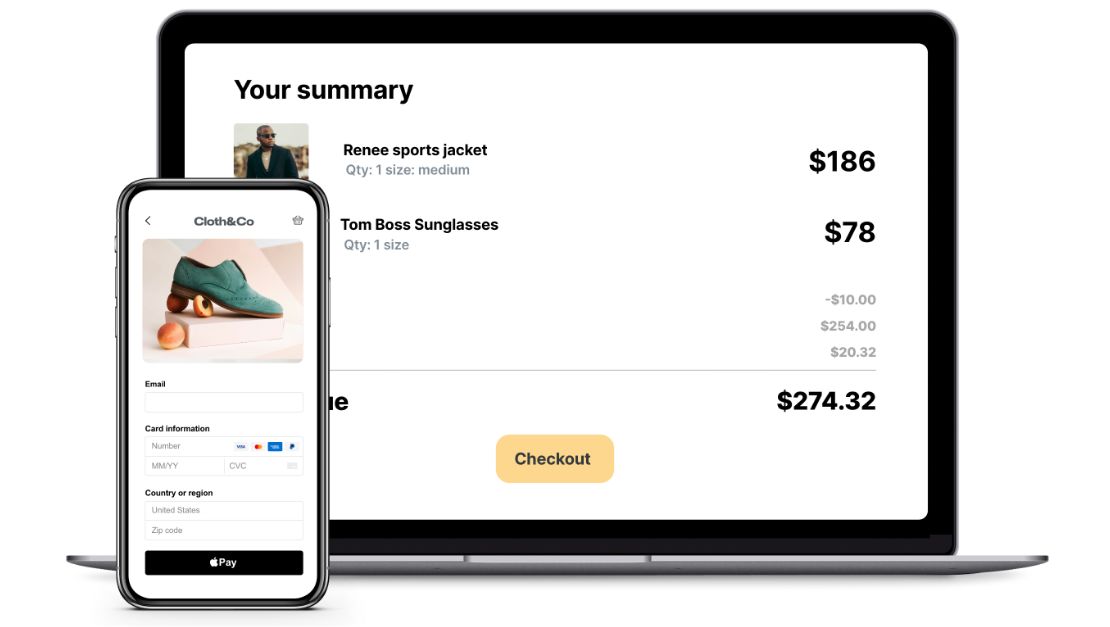
Convert more shoppers to buyers with a user-friendly checkout experience that offers personalized payment options and matches your brand
-
Easily integrate payments into your business’ webpage with popular shopping cart integrations, dev kits to create your own custom cart and live IT support
-
Reduce your PCI scope and your liability with hosted payments pages that tokenize all your transactions
Ready to grow your business with online payments? Learn more about us here.
The information provided in this document does not, and is not intended to constitute legal advice; instead, all information, content, and materials available are for general informational purposes only. Information provided may not constitute the most up-to-date legal or other information, and readers of this information should contact their attorney to obtain advice with respect to any particular legal matter, in the relevant jurisdiction. All liability with respect to actions taken or not taken based on the contents here are hereby expressly disclaimed.
All trademarks contained herein are the sole and exclusive property of their respective owners.